Professional Radio Automation for Windows

Gapless playback, consistent loudness, rotation clocks, jingles, live streams, and optional AI tools — everything your station needs to sound professional on air, in one easy-to-run app.

Windows 10/11 Gapless · Crossfade Rotation Clocks 25 Jingle Buttons Live Streams Optional AI Tools Self-Contained
PlayOnRadio Professional Broadcasting View

Built for On-Air Teams

Everything that matters for day-to-day broadcasting — without the clutter

Highlights

Why stations choose PlayOnRadio

  • Smooth on-air sound — gapless tracks, smart crossfades, and broadcast-style loudness matching
  • Plan the hour in minutes — rotation clocks build playlists from your music library and rules
  • Stay in control live — jingles, cue stops, intro/outro markers, and a clear studio VU meter
  • Run a tighter operation — On-Air Mode, What's Next panel, and schedule confidence alerts
  • Look professional — second-screen now-playing display, station branding, and optional video panel
  • Stay compliant — play history, CSV exports, and airplay compliance reporting
📻

Broadcast-Quality Playback

Two-deck engine built for real radio workflows — music, voice tracks, jingles, and commercials transition naturally without clicks or volume jumps.

  • Gapless playback and configurable crossfades
  • EBU R128-style loudness matching across your library
  • Stereo VU meter with peak hold and overload warning
  • MP3, WAV, WMA, M4A, AAC, FLAC, OGG + live streams
🔄

Rotation Clocks

Design an hour, set categories and repeat rules, preview the result, and generate a ready-to-air playlist from your music library.

  • Hour templates with category slots and timing
  • Visual preview before you go live
  • See why each song was selected
  • Swap or lock items when you need manual control
🕐

Clock-Wheel Scheduling

Fire IDs, jingles, files, or streams at fixed times every hour — the classic radio clock, built in.

  • Hourly slots for jingles, files, and streams
  • Perfect for top-of-hour IDs and recurring elements
  • Works alongside your main playlist
📋

Playlists & Jingles

Drag-and-drop scheduling with start times, instant jingle buttons, and support for both files and live streams in one list.

  • 25 one-touch jingle buttons with automatic volume ducking
  • Drag-and-drop reordering — even while on air
  • Start Time column so you always know what's next
  • Icecast, Shoutcast, and MMS streams shown as LIVE
🎯

Live Handoffs & Cue Points

Mark where to talk over an intro, where to mix out, and where the playlist should stop for live breaks.

  • Playlist stops for news, talk, or manual takeover
  • Intro and outro markers on the progress bar
  • Auto cue detection to speed up prep
🎙️

Operator Tools

Less distraction during live shows, more confidence about what's coming up.

  • On-Air Mode for a cleaner studio view
  • What's Next panel — upcoming tracks and clock events
  • Schedule confidence alerts before problems hit the air
📺

Second Screen & Compliance

Give talent a dedicated now-playing screen and managers the reports they need.

  • Always-on-top display with countdown and artwork
  • Multi-monitor support — drag it to your second screen
  • Airplay compliance dashboard and CSV export
🤖

Optional AI Assistant

When enabled, AI tools help with playlists, voice-track copy, show prep, and rotation rules — optional, not required.

  • AI playlist builder and show prep
  • Voice-track script suggestions
  • Works with your own API or backend endpoint
🎬

Video Playback

Play video inside the studio layout or detach it to a floating window — audio stays locked to your broadcast chain.

  • MP4, MOV, AVI, MKV, and more
  • Detachable panel for multi-monitor setups
📊

History & Reports

Automatic play logging with export for royalty and compliance workflows.

  • Play counts, airtime, first and last played
  • Statistics window and one-click CSV export
  • Scheduled exports for regular reporting
🎨

Your Station, Your Look

Dark or light themes, your logo, and customizable fonts and colors across the playlist, now-playing, and jingle panels.

🔒

Simple Licensing

One license per station PC. Activate with a Hardware ID, receive your license file, and you're on air.

Application Screenshots

See PlayOnRadio in action

PlayOnRadio Main Interface

Main Interface with VU Meter & Digital Timers

PlayOnRadio Playlist and Jingles

Playlist Management & 25 Jingle Buttons

PlayOnRadio Broadcasting View

Professional Broadcasting View

PlayOnRadio Detailed View

Play History & Track Details

PlayOnRadio Branded View

Customizable Station Branding

PlayOnRadio About Window

About & License Information

Trusted by Radio Professionals

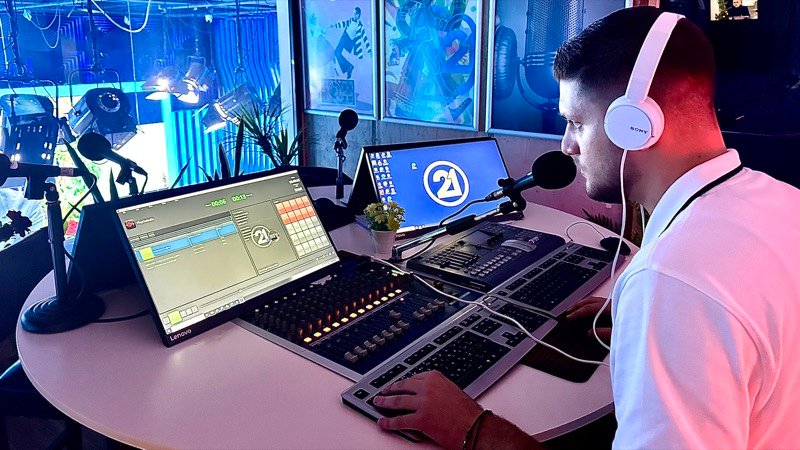
See PlayOnRadio in action at Radiotelevizioni 21

⭐ First Client Success Story

Radiotelevizioni 21

PlayOnRadio powers on-air playback at Radiotelevizioni 21 — from playlist control and rotation clocks to jingles and hourly scheduling.

Pricing & Licensing

Professional radio automation for less than half a coffee a day

🔒 Secure Licensing

Hardware-based licensing with RSA-2048 cryptography ensures your license is secure and tamper-proof.

💳 Payment Options

Contact us for payment processing. We accept bank transfers, PayPal, and other payment methods.

🔄 License Renewal

Annual license includes 1 year of updates and support. Renew before expiration to continue receiving updates.

Technical Specifications

Built with modern technologies for reliability and performance

Platform

  • OS: Windows 10 or 11 (64-bit)
  • RAM: 4 GB minimum (8 GB recommended)
  • Storage: ~200 MB for the application
  • Audio: Any Windows audio device
  • Install: Self-contained — no .NET install required

Audio & Video

  • Audio: MP3, WAV, WMA, M4A, AAC, FLAC, OGG
  • Video: MP4, MOV, AVI, MKV, WMV, and more
  • Streams: Icecast, Shoutcast, MMS (http/https/mms)
  • Engine: Gapless playback, crossfade, loudness matching
  • Metering: Stereo VU with peak hold and clip warning

Automation & Data

  • Rotation clocks and hourly clock-wheel scheduling
  • Play history with CSV export
  • Compliance dashboard for airplay reporting
  • Optional AI tools when you connect an API
  • License: One hardware-locked license per PC

Download & Installation

Get started with PlayOnRadio in minutes

📦

Installer Version

Professional Windows installer with automatic setup

  • ✓ Easy installation wizard
  • ✓ Desktop shortcut creation
  • ✓ Start menu integration
  • ✓ Uninstaller included
Order & Download

~100MB (Self-contained)

First-Time Activation

1

Install & Launch

Install PlayOnRadio and launch the application

2

Get Hardware ID

Copy your unique Hardware ID from the activation window

3

Receive License

Send your Hardware ID to your license provider

4

Activate

Paste the license into the activation dialog and start using PlayOnRadio

Support & Documentation

Everything you need to get the most out of PlayOnRadio

📖 Documentation

Full guides built into the app — press F1 anytime.

  • Getting started and playlist basics
  • Rotation clocks and scheduling
  • Jingles, cue points, and live handoffs
  • License activation

❓ Troubleshooting

Common fixes for everyday station issues.

  • Audio not playing or wrong output device
  • Stream URL won't connect
  • Rotation or clock-wheel timing
  • License activation
  • CSV export and reporting

💬 Contact Support

Get help from our support team

Company: Play On Radio
Email: support@playonradio.com
Copyright: © PlayOnRadio 2026